
7.1
July 22, 2026
- Version 7.1 adds some new API reporting links and counts, improves speed, and fixes some small bugs.
{"counts": "ip": 3, "email": 4, "emaildomain": 28}
We also added a new function to get a list of all usernames that used the same data. To get a list of usernames that use IP 10.1.1.1, make call using the related function:
https://feed-api.ehawk.net/report/related?apikey=your_apikey&value=10.1.1.1&type=ip
{"response": { "type": "ip", "usernames": [ "1213456" , "2356985" , "6599987" ]}, "status": 200}
Supported types for related function are: phone ip emaildomain domain name email The function supports pagination (see below).
The related function makes it easy to get all usernames that are associated with an IP, emaildomain, domain, etc.
"pagination": { "page": 1, "lastpage": 1, "num": 100, "count": 1, "total": 1}
Where:
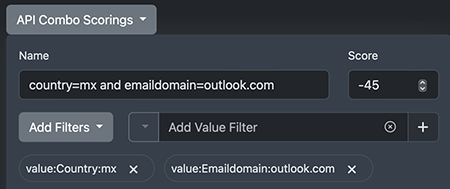
Combo Scoring should be used to tag specific patterns of inputs and risk hits. Use Combo Scoring when you would like to create rules that are based on multiple matches in your data. As an example, to tag all gmail sign-ups from US and Canada: use a Combo Score of input:Emaildomain=>gmail.com + input:IPGeo=>us|ca
You can create custom Combo Scoring per API key. Each Combo Score rule can have:
All filters and values must hit to trigger scoring. The combo names and details are listed in the JSON response and the Portal. The system supports a maximum of 250 Combo rules per API key.
Please make sure to double check regex syntax. There are many online services that can check the validity.
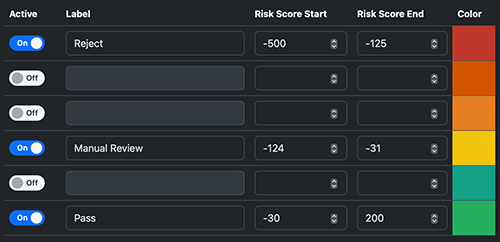
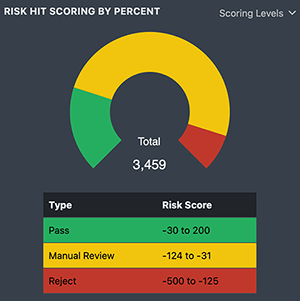

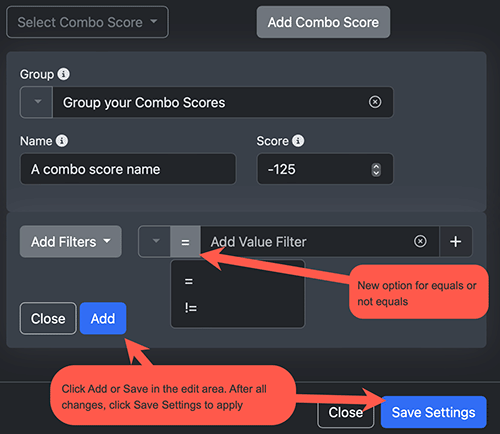
As a reminder, all filters and values must hit to trigger scoring. The combo names and details are listed in the JSON response and in the Portal. Make sure to click Update or Add in Combo Area when creating rules, and when finished with all editing, click Save Settings to save and apply Combo Scoring rules.
https://feed-api.ehawk.net/tag/list/?apikey=your_apikey&type=ip&reason=bad&user=name@example.com

If you are using our Talon.js for device analysis, you must update to version 6.x by Feb 29, 2024. Download v6.x Talon JS in the EHAWK Portal (Account=>Settings, bottom of page) and update your talon code. Talon with versions below 6.x will stop working on March 1, 2024.
What's New? Talon 6.x has been rewritten to run much faster, support more browsers, and provide more reliable analysis.
How do I upgrade to the new 6.x version?
Instructions are available on our website.
This new test/label scores IP traffic quality with the following results:
The new and improved Talon v 6.04 (improved speed, simplified calling, support for more browsers and plug-ins) is ready. Please email support@ehawk.net for instructions. We will be migrating all clients to use 6.x over the coming months.
{
"domain" : {
    "source":"ehawk.net",
    "ns":"pns104.cloudns.net.",
    "mx":"aspmx3.googlemail.com.",
    "mx_ip":"142.250.150.27"
}
For existing clients, both tests will score zero until you have a chance to review the data and adjust the score as you see fit.
Version 5.7 adds new Email: Suspect Pattern test for emails that have bot like addresses. Default score is -5. Review your results and modify scoring as needed. The release also includes many backend updates for our portal such as updated charting, icons, and JS speed improvements.